verdigris • 2025 • in beta
Pivoting from an open-ended chatbot to an investigation assistant
TIMEFRAME
Sep -Nov 2025
ROLE
UX Design, Prototyping, Product Strategy
TOOLS USED
Figma, Claude Code, Vercel
team
Head of Product, Engineering, 3 UW graduate teammates
What does Verdigris do?
Verdigris is an AI-powered IoT platform. Technicians use it to monitor electrical and sensor data in critical facilities and catch issues before they become outages.
What was my impact?
Recommended against shipping the standalone chatbot.
Reframed the product to a proactive assistant, now in beta.
Defined the ship criteria Verdigris still uses to evaluate AI features.
OVERVIEW
How might we help data center technicians investigate issues using AI?
Verdigris was testing an open-ended chatbot that sat apart from the dashboard where alerts show up. Our graduate HCI team ran usability tests and found it was the wrong interface: it pulled technicians away from the very data they were asking about.
problem
Technicians needed to find solutions to faults fast. The chatbot handed the hardest part - figuring out what was wrong, right back to them.

"We are testing this chatbot because a lot of data center technicians don't know what to do with the data itself. They don't know how to analyze it. They just want the building to run efficiently."
Jimit Shah, Head of Product @ Verdigris

SOLUTION
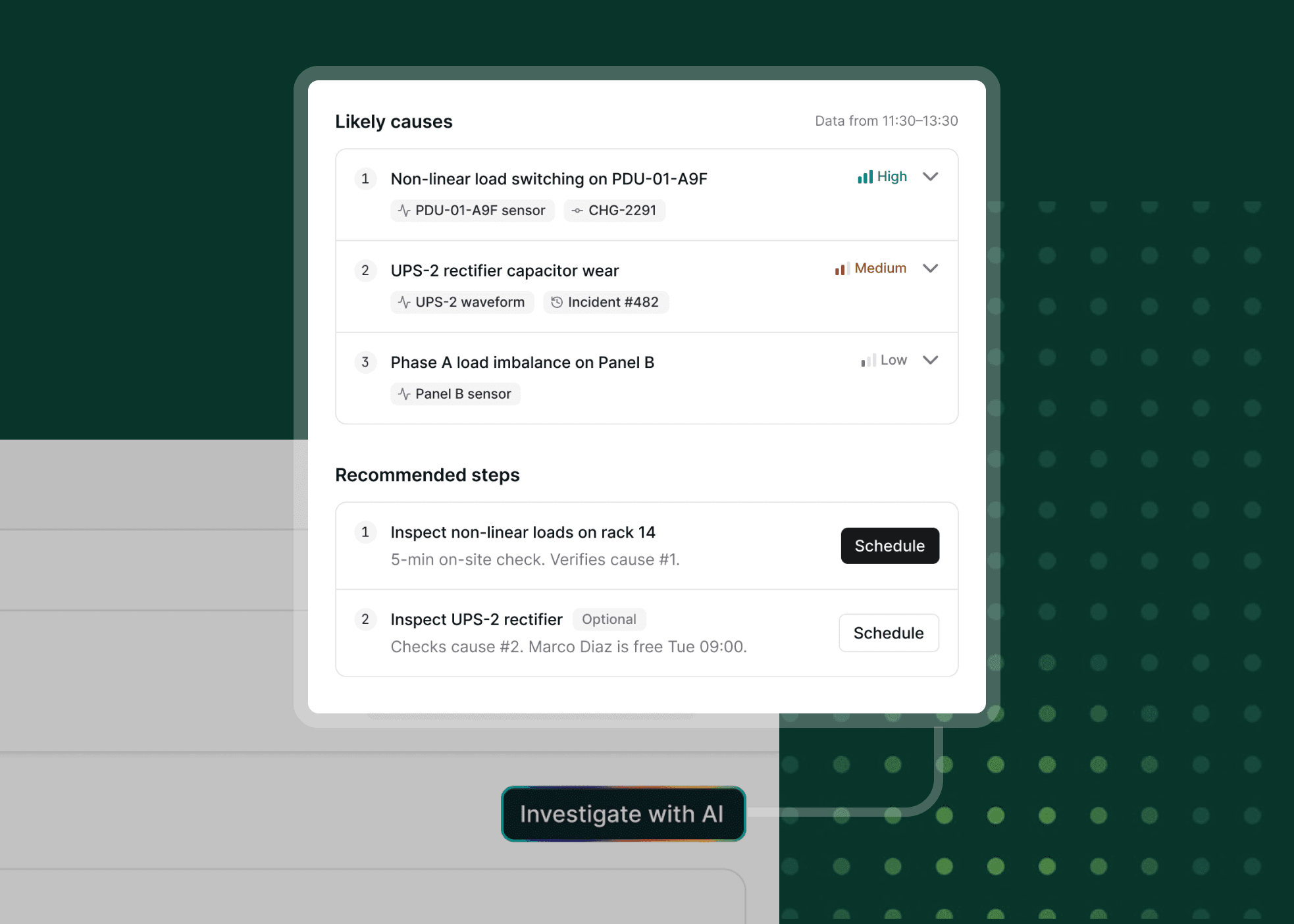
An assistant inside the alert, helping investigate root cause, evidence, and next steps.
1 / Opens from in context within the alert:
Signals Assistant opens as a side panel, so technicians never lose sight of the page they're on.
2 / Root cause:
Diagnoses root causes based on past events and data, so technicians can check the reasoning.
3 / Human in the loop:
Nothing happens automatically. Every action needs a technician's approval.
4 / Optional chat and solution simulation:
Chat is an option for clarification. It also allows users to diagnose possible fixes.
5 / Handoff and sharing with the team


research
Technicians didn't want to type prompts and read long answers. They needed to understand the data and know what to do next.
We ran 9 usability tests of the original chatbot with technicians. The results made it clear it wasn't the right direction.
8 of 9
Struggled to scan the answers.
9 of 9
Asked where answers came from.
Blank prompt
Users had to know what to ask.
We found two types of technicians with different skills and pain points.

NEW TO THE ROLE
New technician
Receives an equipment alert and needs help understanding what the readings mean.
Needs: an explanation, evidence, and a clear first step.
EXPERIENCED
Experienced technician
Knows the equipment and wants to check the analysis and identify next steps quickly.
Needs: source data, clear trade-offs, and control over the action.
Verdigris wanted a differentiator people would trust, so we studied tools people already trust.
I extended their patterns so teams could compare physical repairs and confirm the result with equipment readings.


the pivot
I recommended Verdigris not ship the standalone chatbot, so I reframed the problem around three jobs technicians actually needed done.
Understand the problem
When an alert fires, I want to know what’s wrong and why, so I can stop guessing and start fixing.
Know what to do next
When I understand the cause, I want a clear next step, so I can act fast without digging through data.
Act with confidence
When I’m about to make a fix, I want to see the evidence and likely outcome, so I can trust the decision and stay in control.
iterations
We co-designed with the people who understood the equipment. We tried a side chatbot and a separate app before coming back to the dashboard.
The domain was new to us, and we couldn't visit sites in person. So we co-designed with the Head of Product and 6 operations technicians to understand the data and shape the workflow and learnt along the way
01 / A draggable chatbot beside the dashboard

Why it didn't work: resizing the panel shifted the whole screen and hid the dashboard's charts. Research also showed chat should be a last resort, not the starting point.
outcome
70+ screens and a working prototype, built with the Verdigris design system, Claude Code, and React.
In testing, participants valued seeing the reasoning behind each cause.
But the long list of next steps overwhelmed them, and they couldn't tell which one mattered most. I cut it down to a short ranked list: one recommended step, the rest optional.
next steps
What I’d do next
Test during real alerts. So far, testing used a prototype and scripted scenarios. Next, I'd watch technicians use it during real incidents to see where trust holds up and where it breaks.
Design for when things go wrong. Sensors drop out and data goes missing. I'd design clear empty, loading, and error states so technicians always know what the assistant can and can't see.